Numpy 笔记
学习Numpy 的重点就是学习如果通过数组批量地对数据进行操作。Numpy 数组使我们可以将许多种数据处理任务表达为简洁的数组表达式(否则需要编写循环)。用数组表达代替循环的做法,通常被称为 矢量化。
输入Numpy
import numpy as np
1. 基础操作——创建、基本属性、变形
ndarray(数组)要求所有元素都是 同质 的
1.1 创建
创建数组
| 函数 | 说明 |
|---|---|
| np.array | 将输入数据(列表、元组、数组或其他序列类型)转换为数组。要么推断出dtype(数据类型),要么显示指定dtype。默认直接 复制 输入数据。 |
| np.arange | 类似于内置的range,但返回的是一个数组而不是列表。 |
| np.zeros | 创建一个全是0的数组。 |
| np.ones | 创建一个全是1的数组。 |
| np.empty | 创建新数组,只分配内容空间但不填充任何值。但是返回并不是全是0,大多数情况返回的是一些未初始化的垃圾值。 |
| np.diag | 创建对角线是特殊值的数组,对角线外都是0。 |
| np.linspace | 创建给定的上下限范围之间平均分布的数组。 |
| np.logspace | 创建10的给定次方之间对数分布的数组。 |
| np.meshgrid | 根据一维向量创建矩阵(高维数组)。 |
| np.random | 创建随机数组。 |
np.array
data = [[1, 2, 3, 4], [5, 6, 7, 8]]
arr = np.array(data)
arr
array([[1, 2, 3, 4],
       [5, 6, 7, 8]])
np.arange
np.arange(15)
array([ 0, 1, 2, 3, 4, 5, 6, 7, 8, 9, 10, 11, 12, 13, 14])
np.zeros
np.zeros((3,6))
array([[ 0.,  0.,  0.,  0.,  0.,  0.],
       [ 0.,  0.,  0.,  0.,  0.,  0.],
       [ 0.,  0.,  0.,  0.,  0.,  0.]])
np.ones
np.ones((2, 3, 2))
array([[[ 1.,  1.],
        [ 1.,  1.],
        [ 1.,  1.]],

       [[ 1.,  1.],
        [ 1.,  1.],
        [ 1.,  1.]]])
np.empty
empty = np.empty(4)
empty
array([  0.00000000e+000,  -1.34572688e-315,   2.12264337e-314,
         2.12269460e-314])
empty.fill(5.5)
empty
array([ 5.5, 5.5, 5.5, 5.5])
np.diag
np.diag((1, 2, 3))
array([[1, 0, 0],
       [0, 2, 0],
       [0, 0, 3]])
也可用来做对角切片
x = np.arange(1, 10).reshape((3, 3))
x
array([[1, 2, 3],
       [4, 5, 6],
       [7, 8, 9]])
np.diag(x)
array([1, 5, 9])
np.diag(x, 1)
array([2, 6])
np.diag(x, -1)
array([4, 8])
np.linspace
np.linspace(1, 10, 5)
array([ 1. , 3.25, 5.5 , 7.75, 10. ])
np.logspace
np.logspace(1, 3, 5)
array([   10.        ,    31.6227766 ,   100.        ,   316.22776602,
        1000.        ])
np.meshgrid
x = np.array([-1, 0, 1])
y = np.array([-2, 0, 2])
# 变量xs,ys 分别是在延0轴重复数组x,延1轴重复数组y
xs, ys = np.meshgrid(x, y)
xs
array([[-1,  0,  1],
       [-1,  0,  1],
       [-1,  0,  1]])
ys
array([[-2, -2, -2],
       [ 0,  0,  0],
       [ 2,  2,  2]])
创建随机数组 np.random
| 函数 | 说明 |
|---|---|
| rand | 产生均匀分布的样本值。 |
| randint | 从给定的上下限范围内随机选取整数。 |
| randn | 产生标准正态分布(平均值为0,标准差为1)的样本值。 |
| normal | 产生正态分布的样本值。 |
rand
np.random.rand(5)
array([ 0.90079451, 0.90221624, 0.15606323, 0.88626912, 0.77039811])
randint
np.random.randint(0, 3)
2
np.random.randint(0, 3)
1
np.random.randint(0, 3)
0
np.random.randint(0, 3, size=(3, 2))
array([[1, 1],
       [0, 2],
       [2, 0]])
randn
np.random.randn(5)
array([ 1.5874802 , 0.1310511 , -0.80181936, 0.57206609, -0.94692264])
np.random.randn(2, 3)
array([[ 1.5156661 ,  0.28188904, -2.25781227],
       [-0.78977321, -1.3286388 , -0.35938401]])
normal
产生期望为4,标准差为7的正态分布的6个随机数值
np.random.normal(4, 7, 4)
array([ 8.15897305, -0.24364705, 6.93085358, 2.58621645])
np.random.normal(4, 7, (2, 3))
array([[  4.71287819,  -2.7068944 ,  15.77077204],
       [ 11.82380706,  11.49019428,   2.02487055]])
1.2 基本属性
数据类型
| 类型 | 类型代码 | 说明 |
|---|---|---|
| int | int8, int16, int32, int64 | 整数 |
| float | float16, float32, float64, float128 | 浮点数 |
| complex | complex64, complex128, complex256 | 浮点数表示的复数 |
| bool | bool | 存储 true 和 false 值的布尔类型 |
数组属性
| 函数 | 说明 |
|---|---|
| dtype | 数组的数据类型 |
| astype(类型代码) | 用来转换数值类型 |
| shape | 查看数组每个维度的元素数量 |
| size | 数组的总元素数 |
| ndim | 数组的维度数 |
| nbytes | 数组的字符数 |
arr
array([[1, 2, 3, 4],
       [5, 6, 7, 8]])
print("数据类型(dtype)          :", arr.dtype)
print("各个维度上的元素数量(shape):", arr.shape)
print("元素总数量(size)         :", arr.size)
print("维度数(ndim)             :", arr.ndim)
print("占用字符数(nbytes)       :", arr.nbytes)
数据类型(dtype)          : int64
各个维度上的元素数量(shape): (5, 4)
元素总数量(size)         : 20
维度数(ndim)             : 2
占用字符数(nbytes)       : 160
dtype
np.zeros(5, dtype=int)
array([0, 0, 0, 0, 0])
np.zeros(5, dtype=float)
array([ 0., 0., 0., 0., 0.])
np.zeros(5, dtype=complex)
array([ 0.+0.j, 0.+0.j, 0.+0.j, 0.+0.j, 0.+0.j])
np.array([1, 2, 3, 4], dtype=np.float64)
array([ 1., 2., 3., 4.])
astype
arr.astype(complex)
array([[ 1.+0.j,  2.+0.j,  3.+0.j,  4.+0.j],
       [ 5.+0.j,  6.+0.j,  7.+0.j,  8.+0.j]])
2. 索引与切片
数组的切片只是原数组的 __视图__。这意味着数据不回被复制,视图上的任何修改都会直接反应到源数组上。
如果想要得到切片的一份副本而非视图,就需要进行复制操作,例如arr[5:8].copy()
2.1 切片索引
一维索引
|表达|说明| |—|—| |a[m]|选取第 m 个元素,从0开始计算| |a[-m]|选取倒数第 m 个元素,从-1 开始计算| |a[m:n]|选取第 m 到 n-1 的元素(m、n 为整数)| |a[:] or a[0:-1]|选取轴上的全部元素| |a[:n]|选取第 0 到 n-1 的元素| |a[m:] or a[m:-1]|选取第 m 到最后的所有元素| |a[::-1]|倒序选区所有元素|
多维索引
索引方式:a[y][x] 或 a[y, x]
索引数字顺序从高维向低维:
一维——索引x轴(1轴)
二维——先索引y轴(0轴),再索x轴(1轴)
三维——先索引z轴,再索引y轴(0轴),然后索引x轴(1轴)
arr3d = np.arange(1,13).reshape(2, 2, 3)
arr3d
array([[[ 1,  2,  3],
        [ 4,  5,  6]],

       [[ 7,  8,  9],
        [10, 11, 12]]])
arr3d[1]
array([[ 7,  8,  9],
       [10, 11, 12]])
arr3d[1][1]
array([10, 11, 12])
arr3d[1, 1, 1:2]
array([11])
切片赋值
arr3d[0]
array([[1, 2, 3],
       [4, 5, 6]])
old_values = arr3d[0].copy()
old_values
array([[1, 2, 3],
       [4, 5, 6]])
arr3d[0] = 100
arr3d
array([[[100, 100, 100],
        [100, 100, 100]],

       [[  7,   8,   9],
        [ 10,  11,  12]]])
arr3d[0] = old_values
arr3d
array([[[ 1,  2,  3],
        [ 4,  5,  6]],

       [[ 7,  8,  9],
        [10, 11, 12]]])
2.2 布尔型索引
| 将判断(>/>=/</<=/==/!=)返回的布尔值作为索引条件选区数据。多个判断可以用&(和)、 | (或)等逻辑关联。 |
data = np.random.randn(7,4)
data
array([[ 2.02121853, -0.3417102 , -0.55666994, -1.86032535],
       [ 1.73476976, -2.45039007,  0.14603374,  0.66659723],
       [ 0.72585888, -0.52163889,  0.32900547, -0.09850365],
       [-1.09943129,  0.48831424, -0.02574601,  0.84756898],
       [ 1.96597553,  1.39159752, -0.51778462,  0.25498703],
       [-1.04308369,  0.13513272, -1.15460956,  0.63697499],
       [-0.51813368, -1.06168638, -2.25424698, -0.19589059]])
names = np.array(["Bob", "Joe", "Will", "Bob", "Will", "Joe", "Joe"])
names
array(['Bob', 'Joe', 'Will', 'Bob', 'Will', 'Joe', 'Joe'],
      dtype='|S4')
判断条件
names == "Bob"
array([ True, False, False, True, False, False, False], dtype=bool)
布尔索引
0轴
data[names == "Bob"]
array([[ 2.02121853, -0.3417102 , -0.55666994, -1.86032535],
       [-1.09943129,  0.48831424, -0.02574601,  0.84756898]])
0轴、1轴
data[names == "Bob", 2]
array([-0.55666994, -0.02574601])
否定条件
data[names != "Bob"]
array([[ 1.73476976, -2.45039007,  0.14603374,  0.66659723],
       [ 0.72585888, -0.52163889,  0.32900547, -0.09850365],
       [ 1.96597553,  1.39159752, -0.51778462,  0.25498703],
       [-1.04308369,  0.13513272, -1.15460956,  0.63697499],
       [-0.51813368, -1.06168638, -2.25424698, -0.19589059]])
data[-(names == "Bob")]
/Users/lixin/anaconda/lib/python2.7/site-packages/ipykernel/__main__.py:1: DeprecationWarning: numpy boolean negative, the `-` operator, is deprecated, use the `~` operator or the logical_not function instead.
  if __name__ == '__main__':


array([[ 1.73476976, -2.45039007,  0.14603374,  0.66659723],
       [ 0.72585888, -0.52163889,  0.32900547, -0.09850365],
       [ 1.96597553,  1.39159752, -0.51778462,  0.25498703],
       [-1.04308369,  0.13513272, -1.15460956,  0.63697499],
       [-0.51813368, -1.06168638, -2.25424698, -0.19589059]])
多个布尔条件索引
mask = (names == "Bob") | (names == "Will")
data[mask]
array([[ 2.02121853, -0.3417102 , -0.55666994, -1.86032535],
       [ 0.72585888, -0.52163889,  0.32900547, -0.09850365],
       [-1.09943129,  0.48831424, -0.02574601,  0.84756898],
       [ 1.96597553,  1.39159752, -0.51778462,  0.25498703]])
索引赋值
data[data < 0] = 0
data
array([[ 2.02121853,  0.        ,  0.        ,  0.        ],
       [ 1.73476976,  0.        ,  0.14603374,  0.66659723],
       [ 0.72585888,  0.        ,  0.32900547,  0.        ],
       [ 0.        ,  0.48831424,  0.        ,  0.84756898],
       [ 1.96597553,  1.39159752,  0.        ,  0.25498703],
       [ 0.        ,  0.13513272,  0.        ,  0.63697499],
       [ 0.        ,  0.        ,  0.        ,  0.        ]])
2.3 花式索引
利用循环索引
arr = np.empty((8,4))
arr
array([[  0.00000000e+000,   1.34581569e-315,   1.13635099e-322,
          0.00000000e+000],
       [  0.00000000e+000,   0.00000000e+000,   0.00000000e+000,
          0.00000000e+000],
       [  0.00000000e+000,   0.00000000e+000,   0.00000000e+000,
          0.00000000e+000],
       [  0.00000000e+000,   0.00000000e+000,   0.00000000e+000,
          8.37170573e-144],
       [  0.00000000e+000,   0.00000000e+000,   7.41098469e-323,
          0.00000000e+000],
       [  0.00000000e+000,   0.00000000e+000,   0.00000000e+000,
          0.00000000e+000],
       [  0.00000000e+000,   0.00000000e+000,   0.00000000e+000,
          0.00000000e+000],
       [  0.00000000e+000,   0.00000000e+000,   0.00000000e+000,
          2.81617418e-322]])
for i in range(8):
    arr[i] = i

arr
array([[ 0.,  0.,  0.,  0.],
       [ 1.,  1.,  1.,  1.],
       [ 2.,  2.,  2.,  2.],
       [ 3.,  3.,  3.,  3.],
       [ 4.,  4.,  4.,  4.],
       [ 5.,  5.,  5.,  5.],
       [ 6.,  6.,  6.,  6.],
       [ 7.,  7.,  7.,  7.]])
利用整数组进行索引
arr = np.arange(32).reshape(8, 4)
arr
array([[ 0,  1,  2,  3],
       [ 4,  5,  6,  7],
       [ 8,  9, 10, 11],
       [12, 13, 14, 15],
       [16, 17, 18, 19],
       [20, 21, 22, 23],
       [24, 25, 26, 27],
       [28, 29, 30, 31]])
正整数
arr[[4, 3, 0]]
array([[16, 17, 18, 19],
       [12, 13, 14, 15],
       [ 0,  1,  2,  3]])
负整数
arr[[-1,-7,-5]]
array([[28, 29, 30, 31],
       [ 4,  5,  6,  7],
       [12, 13, 14, 15]])
选取元素 (4,1)、(3,3)、(0,0)
arr[[4, 3, 0], [1, 3, 0]]
array([17, 15, 0])
按照一定顺序索引
arr[[4, 3, 0]][:, [0, 3, 1, 2]]
array([[16, 19, 17, 18],
       [12, 15, 13, 14],
       [ 0,  3,  1,  2]])
3. 数组计算
大小相同 的数组之间的任何运算都会将运算应用到 __元素级__。
3.1 基础计算
| 符号 | 运算 |
|---|---|
| +, += | 加法 |
| -, -= | 减法 |
| *, *= | 乘法 |
| /, /= | 除法 |
| **, **= | 幂运算,乘方 |
| //, //= | 整除(丢弃余数) |
| % | 求余数 |
arr = np.arange(1,7).reshape(2, 3)
arr
array([[1, 2, 3],
       [4, 5, 6]])
arr * arr
array([[ 1,  4,  9],
       [16, 25, 36]])
arr ** arr
array([[    1,     4,    27],
       [  256,  3125, 46656]])
arr//2
array([[0, 1, 1],
       [2, 2, 3]])
arr%2
array([[1, 0, 1],
       [0, 1, 0]])
3.2 通用函数(ufunc)
一元通用函数(ufunc)
| 函数(np.ufunc) | 说明 |
|---|---|
| abs、fabs | 绝对值 |
| sqrt | 平方根$\sqrt{arr}$ |
| square | 平方 |
| exp | 指数$e^{x}$ |
| log, log10, log2 | 分别为自然对数(底数为e),底数为10的log,底数为2的log |
| cos, sin, tan | 普通的三角函数 |
| cosh, sinh, tanh | 双曲型三角函数 |
| arccos, arccosh, arcsin, arcsinh, arctan, arctanh | 反三角函数 |
arr
array([[1, 2, 3],
       [4, 5, 6]])
np.sqrt(arr)
array([[ 1.        ,  1.41421356,  1.73205081],
       [ 2.        ,  2.23606798,  2.44948974]])
np.exp(arr)
array([[   2.71828183,    7.3890561 ,   20.08553692],
       [  54.59815003,  148.4131591 ,  403.42879349]])
二元通用函数(ufunc)
两个大小相等的数组内对应元素间进行计算
| 函数(np.ufunc) | 说明 |
|---|---|
| add | 对应元素相加 |
| subtract | 第一个数组元素减去第二个数组对应元素 |
| multiple | 对应元素相乘 |
| divide,floor_divide | 对应元素相除,或整除(丢弃余数) |
| power | 第一组元素为a,第二组元素为b,计算$a^{b}$ |
| maximum, fmax | 对应元素比较,取最大 |
| minimum, fmin | 对应元素比较,取最小 |
| mod | 对应元素相除求余数 |
| copysign | 将第二组元素的符号复制给第一组的元素 |
| greater, greater_equal, less, less_equal, equal, not_equal | 对应元素比较,产生布尔行数组 |
| logical_and, logical_or, logical_xor | 元素级的真值逻辑运算,相当于&, |, ^ |
x = np.random.randn(5)
x
array([ 0.12569472, 0.14965116, -0.62228971, 0.26996402, -1.14998285])
y = np.random.randn(5)
y
array([-0.26796225, -0.19031185, 0.52450819, -0.93463122, -1.64192667])
np.maximum(x, y)
array([ 0.12569472, 0.14965116, 0.52450819, 0.26996402, -1.14998285])
$\sqrt{x^{2}+y^{2}}$
np.sqrt(x**2 + y**2)
array([ 0.29597792, 0.24210343, 0.81385092, 0.97283919, 2.00459067])
3.3 数组统计
利用数学函数对整个数组或某个轴向的数据进行统计计算。
| 函数 | 说明 |
|---|---|
| sum | 对数组中全部或某轴向的元素求和 |
| mean | 算数平均数 |
| std, var | 分别为标准差和方差 |
| max, min | 最大值,最小值 |
| argmax, argmin | 分别为首个最大和最小元素的索引,返回布尔值 |
| cumsum | 所有元素的累计和 |
| cumprod | 所有元素的累计积 |
| sort | 从小到大排序 |
| unique | 返回数组中的唯一值,并排序 |
| any | 判断数组中是否存在true,返回布尔值 |
| all | 判断数组中元素是否都是true,返回布尔值 |
arr = np.arange(1,21).reshape(5,4)
arr
array([[ 1,  2,  3,  4],
       [ 5,  6,  7,  8],
       [ 9, 10, 11, 12],
       [13, 14, 15, 16],
       [17, 18, 19, 20]])
arr.mean()
10.5
arr.mean(axis=1)
array([ 2.5, 6.5, 10.5, 14.5, 18.5])
arr.cumsum(axis=0)
array([[ 1,  2,  3,  4],
       [ 6,  8, 10, 12],
       [15, 18, 21, 24],
       [28, 32, 36, 40],
       [45, 50, 55, 60]])
排序
sort( )
data = np.random.rand(4,5)
data
array([[ 0.09270272,  0.74430856,  0.81803084,  0.687264  ,  0.85338947],
       [ 0.83754576,  0.98844061,  0.24495832,  0.62303181,  0.57159207],
       [ 0.53200281,  0.21076207,  0.89044152,  0.29566154,  0.6730768 ],
       [ 0.63042717,  0.97308461,  0.35606836,  0.07726935,  0.83092571]])
data.sort(axis=0)
data
array([[ 0.09270272,  0.21076207,  0.24495832,  0.07726935,  0.57159207],
       [ 0.53200281,  0.74430856,  0.35606836,  0.29566154,  0.6730768 ],
       [ 0.63042717,  0.97308461,  0.81803084,  0.62303181,  0.83092571],
       [ 0.83754576,  0.98844061,  0.89044152,  0.687264  ,  0.85338947]])
np.unique( )
ints = np.array([3, 3, 3, 4, 2, 2, 4, 1, 1])
np.unique(ints)
array([1, 2, 3, 4])
布尔数组
bools = np.array([False, False, True, False])
bools
array([False, False, True, False], dtype=bool)
any( )
bools.any()
True
all( )
bools.all()
False
3.4 条件逻辑表达式
numpy.where 函数是三元表达式x if condition else y 的矢量化版本。
xarr,yarr 为数组。
cond 为布尔型数组。
numpy.where 表示 cond 为真时,执行xarr,否则执行yarr。
xarr = np.array([1.1, 1.2, 1.3, 1.4, 1.5])
yarr = np.array([2.1, 2.2, 2.3, 2.4, 2.5])
cond = np.array([True, False, True, True, False])
np.where(cond, xarr, yarr)
array([ 1.1, 2.2, 1.3, 1.4, 2.5])
利用条件逻辑表达式进行赋值
arr = np.random.randn(4,4)
arr
array([[-0.97170106,  0.39422479, -0.87202839,  0.95650709],
       [ 0.01440846,  1.57808512, -0.31303884,  0.1833287 ],
       [ 0.61855283, -0.39369561,  0.39966876, -0.29794251],
       [ 0.34755575,  1.91619738,  1.65520593, -0.32377046]])
np.where(arr>0, 2, -2)
array([[-2,  2, -2,  2],
       [ 2,  2, -2,  2],
       [ 2, -2,  2, -2],
       [ 2,  2,  2, -2]])
原数组未变
arr
array([[-0.97170106,  0.39422479, -0.87202839,  0.95650709],
       [ 0.01440846,  1.57808512, -0.31303884,  0.1833287 ],
       [ 0.61855283, -0.39369561,  0.39966876, -0.29794251],
       [ 0.34755575,  1.91619738,  1.65520593, -0.32377046]])
np.where(arr>0, 2, arr)
array([[-0.97170106,  2.        , -0.87202839,  2.        ],
       [ 2.        ,  2.        , -0.31303884,  2.        ],
       [ 2.        , -0.39369561,  2.        , -0.29794251],
       [ 2.        ,  2.        ,  2.        , -0.32377046]])
利用 cond1,cond2 的四种不同布尔值组合实现赋值操作
result=[]
for i in range(n):
    if cond1[i] and cond2[2]:
        result.append[o]
    elif cond1[i]:
        result.append[1]
    elif cond2[i]:
        result.append[2]
    else:
        result.append[3]
np.where(cond1 & cond2, o,
          np.where(cond1, 1,
                     np.where(cond2, 2, 3)))
4. 广播
广播是指:不同大小的数组之间的算数运算的执行方式。
广播的原则
如果两个数组的后缘维度(从末尾开始算起的维度)的轴长度相符或其中一方的长度为1,则认为他们是广播兼容。广播会在缺失和(或)长度为1的维度上进行。
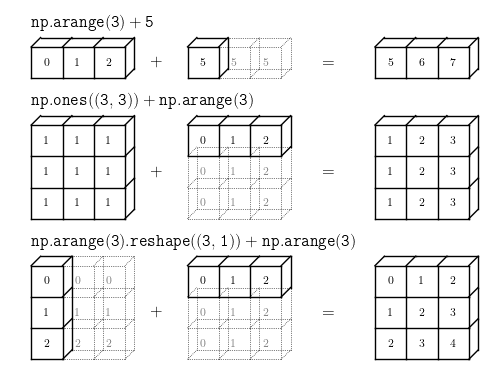
arr = np.arange(5)
arr + 5
array([5, 6, 7, 8, 9])
np.ones((3, 3))
array([[ 1.,  1.,  1.],
       [ 1.,  1.,  1.],
       [ 1.,  1.,  1.]])
np.ones((3, 3)) + np.arange(3)
array([[ 1.,  2.,  3.],
       [ 1.,  2.,  3.],
       [ 1.,  2.,  3.]])
np.arange(3).reshape(3, 1)
array([[0],
       [1],
       [2]])
np.arange(3).reshape(3, 1) + np.arange(3)
array([[0, 1, 2],
       [1, 2, 3],
       [2, 3, 4]])
5. 线性代数计算
| 函数 | 说明 |
|---|---|
| dot | 矩阵乘法 |
| trace | 对角线元素的和 |
| det | 矩阵行列式 |
| eig | 方针的本征值和本征向量 |
| inv | 方针的逆 |
转置矩阵
arr
array([0, 1, 2, 3, 4])
arr.T
array([0, 1, 2, 3, 4])
矩阵乘法
arr = np.arange(3)
arr
array([0, 1, 2])
np.dot(arr, arr.T)
5
6. 数组存储
文本保存
arr = np.arange(10).reshape(2, 5)
np.savetxt('test.out', arr)
!cat test.out
0.000000000000000000e+00 1.000000000000000000e+00 2.000000000000000000e+00 3.000000000000000000e+00 4.000000000000000000e+00
5.000000000000000000e+00 6.000000000000000000e+00 7.000000000000000000e+00 8.000000000000000000e+00 9.000000000000000000e+00
arr2 = np.loadtxt('test.out')
arr2
array([[ 0.,  1.,  2.,  3.,  4.],
       [ 5.,  6.,  7.,  8.,  9.]])
二进制保存
arr = np.arange(10)
np.save('some_array', arr)
np.load('some_array.npy')
array([0, 1, 2, 3, 4, 5, 6, 7, 8, 9])
多个数组保存在一个压缩文件中
np.savez('array_archive.npz', a=arr, b=arr)
arch = np.load('array_archive.npz')
arch['b']
array([0, 1, 2, 3, 4, 5, 6, 7, 8, 9])

This work is licensed under a CC A-S 4.0 International License.